Some of Anthropic's best products require a subscription.
By Igor Bonifacic June 3, 2026 9:30 am EST Igor Bonifacic for Engadget
 If you're new to Claude, the chatbot's usage limits can feel ill-defined. Part of the problem here is that every prompt comes with a unique compute cost, but Anthropic's own website is also frustratingly vague on how much you can use Claude before you need to take a break. While I can't give exact numbers, this article will give you a better idea of what limitations the company imposes on free accounts.
What are rate limits on AI chatbots?
 Antrhopic
 Before I get to Anthropic's specific policies, let's talk about why AI rate limits exist in the first place. When you type a prompt into a chatbot, a process called inference occurs. Behind the scenes, a large language model is applying the patterns it learned in training to an input it hasn't seen before. Inference is computationally expensive and, more importantly, there's no natural ceiling in terms of cost. As an AI company, you have a love-hate relationship with your most engaged users because, without putting restrictions on them, they can cost you thousands of dollars in processing costs.
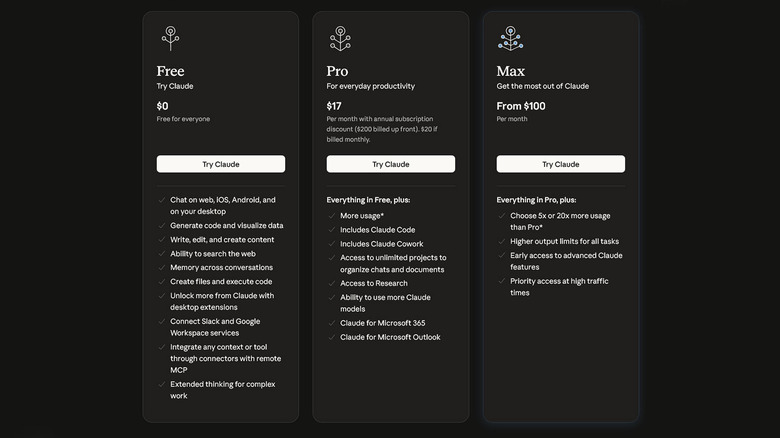
Anthropic, like most AI companies, doesn't publish exact rate limits, but it does provide some clues to guide users. Notably, the company says its limits are structured around a rolling five-hour window that starts when you first prompt Claude. This window does not reset at midnight, meaning you can't game the system by putting in a bunch of prompts before the end of the day. Anthropic also notes "the number of messages you can send will vary based on demand, and we may impose other types of usage limits to ensure fair access to all users." Other factors that can influence daily caps include the complexity of your prompts and the size of any attachments you ask Claude to analyze.
Taken together, this means during one five-hour window you might hit your limit after just a few prompts, while in another it might take a dozen or so before Claude warns you. Anthropic's rate limits are a frequent topic of discussion on Reddit, with one user recently complaining of blowing past their five-hour limit after a single Claude Code prompt. However, as a rule of thumb, most people should be able to send about 15 to 40 messages to Claude every five hours.
For a more technical explanation, Claude, like all large language models, uses "tokens" to generate answers. Think of tokens as the operating currency of current AI systems. When you type a question into Claude's prompt bar, it converts words, groups of characters and punctuation, through a process known as tokenization, into numbers that map to different patterns and relationships that Anthropic's models learned during their training process. Those models then consume tokens to provide answers.
Therefore, longer, more involved questions not only use more of that currency upfront, but they also incur a greater cost when a model tries to answer them. That's why Claude's usage limits can feel like a moving target: every question has its own unique compute cost. It's also for that reason that Anthropic recommends you keep your prompts concise and clear. And please, don't waste tokens thanking Claude for its hard work.
Separately, Anthropic also enforces length limits, which relate to Claude's context window or the amount of information the chatbot can process and "remember" in the space of a single chat. Here, the company is more transparent. Outside of its Enterprise plans, that limit is 200,000 tokens long across all of its models and paid plans.
Model access and features at the free tier
 Anthropic
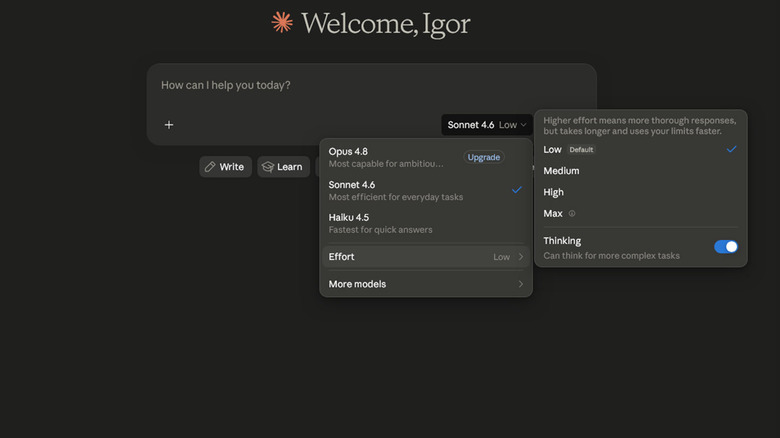
 Anthropic limits free users to just two of its three models. As of the writing of this article, that's Sonnet 4.6 and Haiku 4.5, leaving out the company's flagship offering, Opus 4.8, out of the mix. As far as free offerings go, Anthropic's Sonnet models have consistently been among the best I've tested, and the new 4.6 release is no different. Plus, it's the system Claude defaults to when you first launch the chatbot.
On the subject of models, I want to draw your attention to Claude's model picker where you'll find the Effort menu. Here, your options are Low, Medium, High and Max, and as Anthropic explains "higher effort means more thorough responses, but takes longer and uses your limits faster." Inside this menu you'll also find a toggle labeled Adaptive thinking, which gives Claude the freedom to use its reasoning capabilities when it determines they could help produce a better answer. I recommend enabling this feature, even if you end up going through some of your daily limits faster; Claude is pretty good at using it sparingly and it brings about a noticeable improvement for prompts that can benefit from the extra processing.
At the free tier, users also get access to a handful of features that help round out Claude's capabilities, including web search and file uploads (with a limit of up to 20 files per chat and 500MB per file). You also get access to Projects and Artifacts. The former allows you to organize conversations and related materials around a single topic and set custom instructions for Claude, while Artifacts are small apps and games Claude can program for you. Think interactive flashcards, a resume analyzer or an AI twist on Snake.
What you won't get is Claude Design and Claude Code. The latter probably needs no introduction. It's Anthropic's agentic coding tool and a big reason why the company has been so successful recently. While you can't use Claude Code with a free account, you can still ask the chatbot coding-related questions, allowing you to copy and paste code snippets for one-off debugging help. Without Claude Code, you also don't get access to its offshoot, Claude Cowork, which you can install on your computer to complete tasks for you. As for Claude Design, Anthropic's recently released design agent, it's currently only available as a preview to Pro, Max, Team and Enterprise subscribers.
Ads and model training
 Igor Bonifacic for Engadget
 As a free user, one thing you won't have to endure while using Claude is ads. In February, after OpenAI announced it was starting to test sponsored responses, Anthropic pledged Claude would remain ad-free. The company said that "including ads in conversations with Claude would be incompatible" with the chatbot becoming a "genuinely helpful assistant for work and for deep thinking."
Depending on when you signed up for Claude, you may have been enrolled in model training by default, in which case you will need to opt out manually. You can do that from the Privacy section of the settings menu. Toggle off Help improve Claude. Anthropic notes "if our safety classifiers flag your conversations, they may still be used to improve our internal trust and safety models, detect harmful content, enforce our policies, or advance our safety research."